
Marking Mode streamlines attendance entry by letting administrators mark attendance freely without submitting each change individually.
All updates are saved in one go — only when the user clicks Save.
How to enable Marking Mode
Show or toggle Marking Mode by clicking the “Marking Mode” checkbox.
Once enabled, you can begin marking attendance without triggering immediate submissions.
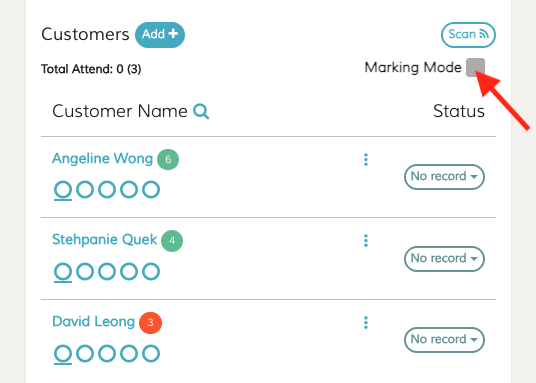
How Marking Mode works
- You can mark, unmark, or adjust attendance freely.
- Changes are not submitted immediately — they’re held until you click Save.
- This lets you review and adjust attendance before finalizing.
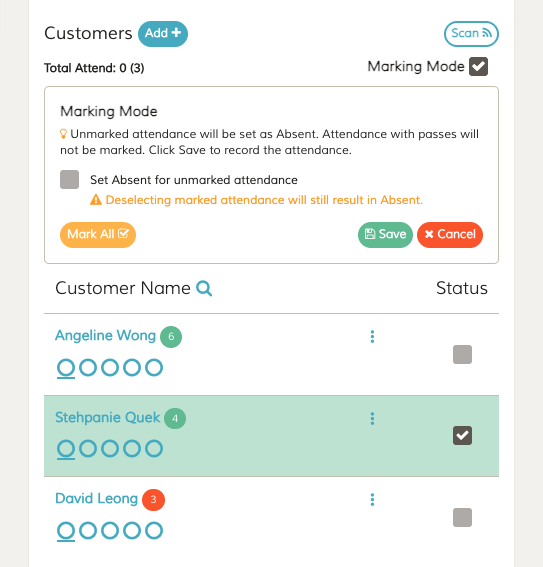
Checkbox: “Set Absent for unmarked attendance”
This option controls how FeePlus handles participants whose attendance status is left blank:
- ✅ Checked → All unmarked participants will be marked as Absent when you click Save.
- ⬜ Unchecked → Unmarked participants will remain unmarked.
⚠️ Note: If you deselect a previously marked participant, they will still be set as Absent, regardless of this checkbox.
💡 Tips: If you later want unmarked attendance to be set as Absent, re‑enable Marking Mode, check “Set Absent for unmarked attendance,” and click Save.
System Rules
- Attendance with passes will not be marked or changed.
- Deselecting a marked participant will result in Absent, even if the set absent checkbox is off.
- Click Save to finalize and record all attendance changes.
Action Buttons
- Mark All → Sets all participants to “Attend” (changes will be saved when you click Save).
- Save → Records the current attendance status for all participants.
- Cancel → Discards changes and exits Marking Mode.
When to use Marking Mode
Use Marking Mode when you need to review or update multiple attendance entries at once. It’s especially helpful when:
- You have a large number of participants to mark
- You want to avoid submitting each change individually
- You need time to review, adjust, or correct attendance before saving
- You want a safer, more controlled way to finalize attendance in one action
Marking Mode keeps the process fast, tidy, and error‑resistant — ideal for busy classes, events, or sessions with many participants.